Bash Scripting
What is Bash Scripting?
A Bash script is a plain text file which contains a series of commands. These commands then tell your computer what it should do.
Tutorial
Step 0
We should first locate your bash interpreter. To do so we enter which bash into the terminal.
It should look like this:

We should also find a text editor for bash. I use TextWrangler. Download one you like and learn how to use it.
Step 1: Variables
All bash shell scripts start with a shebang #! followed by the location of your bash interpreter.
Create a directory named Learning_Bash. In Learning_Bash create a file named step1.sh (all bash scripts end in .sh)

Before running the file, you must first make it executable. To make it executable you must type into terminal chmod +x step1.sh. To run the bash script you must then type into terminal ./step1.sh
Step 2: Shell Commands in Bash

Again you must make every file executable by typing chmod +x filename into the command line and to run the file you must type ./filename in the command line. Another way to run bash scripts is typing bash step2.sh.
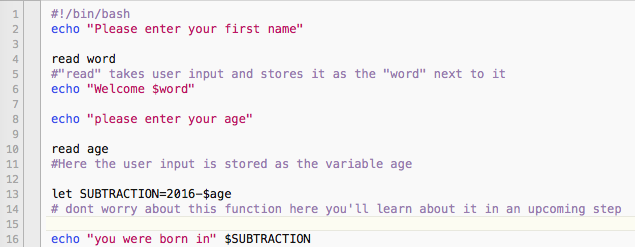
Step 3: User Input
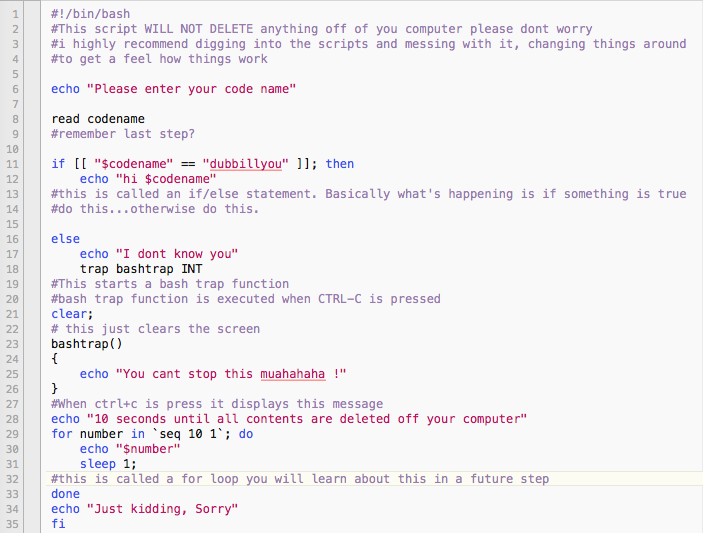
Step 4: If/ Else Statements
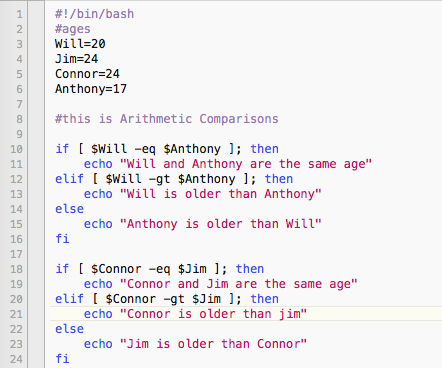
Step 5: Comparisons
| Arithmetic Comparisons | |
| -lt | < |
| -gt | > |
| -le | <= |
| -ge | >= |
| -eq | == |
| -ne | != |
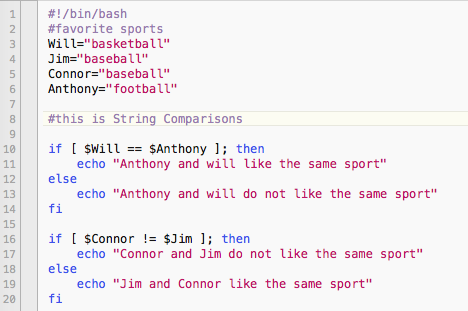
| String Comparisons | |
| = | equal |
| != | not equal |
| < | less then |
| > | greater then |
| -n s1 | string s1 is not empty |
| -z s1 | string s1 is empty |
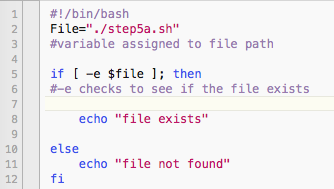
Step 6: File Testing
| -b filename | Block special file |
| -c filename | Special character file |
| -d directoryname | Check for directory existence |
| -e filename | Check for file existence |
| -f filename | Check for regular file existence not a directory |
| -G filename | Check if file exists and is owned by effective group ID. |
| -g filename | true if file exists and is set-group-id. |
| -k filename | Sticky bit |
| -L filename | Symbolic link |
| -O filename | True if file exists and is owned by the effective user id. |
| -r filename | Check if file is a readable |
| -S filename | Check if file is socket |
| -s filename | Check if file is nonzero size |
| -u filename | Check if file set-ser-id bit is set |
| -w filename | Check if file is writable |
| -x filename | Check if file is executable |
Step 8: Calculations
